blogger templatesblogger widgets
Showing posts with label Google Local. Show all posts

7 Quick Tips About Optimize Your “Google My Business” Page

Guide to Optimizing Your Brand's Google+ Page

A Few Quick SEO Wins Your Google+ Page Needs - Steps to Optimizing Your Google+ Business Page for Success.

Google My Business (Google Local) continues to remain one of the fastest-growing social media sites on the planet, Google+ is an important part of any small business’s marketing strategy. In a recent survey it was mentioned that there are over 40 million users actively using Google+, which means the audience, is there – you just need to reel those customers in!
Google Business Listing
Google Local Business Listing

Optimize Your Page for Search Results


Now that you’ve created your company business page  at Google My Business (Google’s local listings associated with Google Maps), take the time needed to complete your listing.

Although this step isn’t difficult, it is very important.

Here are a 7 simple steps to optimizing your listing and why it matters to potential clients:

Optimizing Your Google My Business Page

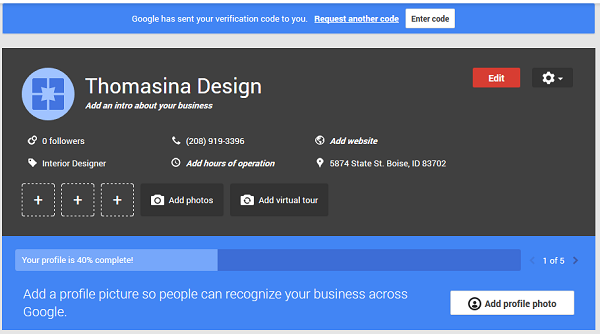
From your dashboard, click the red “Edit” button.
Google My Business Optimization
Google My Business Page Dashboard

That will open the editing dashboard which is separated into 7 steps. Each steps can be edited by clicking on the small pencil icon in the upper right-hand corner each section. For the most part, you just want to be sure to fill out each section as completely as possible. 

The 7 steps are:

  1. Business Name: This section cannot be edited until your business page has been verified.
  2. Address: Make sure that your address is correct and is written out as your default NAP (Name, Address and Phone). This is the version that all other listings across the web will be compared to.
  3. Contact info: Add your company phone number and Website URL.
  4. Category: This is the most important part of the optimizing process. You can choose up to 5 categories for your business – these are the categories that Google will associate with your business, and let Google know what your business is about. 
  5. Google Page Categories
    Adding Categories to your Google My Business Page
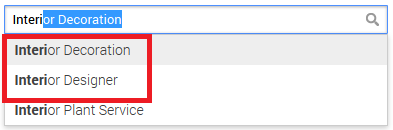
    1. Start with a broad category for this tutorial we will use "Interior Design". Google autofills category options as you type, add appropriate categories from the suggestion list. As seen in the above image it suggests for "Interior Designer" and "Interior Decoration" – both good terms for this business.
    2. As most recent Google’s Guidelines suggest using “few categories as possible to describe your  business”, In this tutorial we selected "Interior Designer" and move on to the next step.
  6. Hours: Add regular hours for your business. It is very important as Local searchers are often interested in your business hours.
  7. Maps & Search photos: Visitors generally prefer images to words so its important to include high quality images as part of your listing. At least, we would recommend adding picture of your store or office front to help visitors find you more easily.
  8. Introduction: The introduction is another very important section that is often underutilized. When planning your business introduction, plan for both audiences – your potential customers and the search engines.
    1. This is another opportunity to communicate with Google about your business. Add information about the products and services offered by your company . Although you can only set up a local listing for the geographic area in which you have a physical address, In addition, you can include any other communities that you might serve in this section.
    2. Click the ‘Done Editing’ button.
Add Your Profile Photo

The profile photo fits in the small circle at the top left-hand side of your Google My Business dashboard. This photo will also display in the profile picture (small circle) on your Google+ Page, and will be displayed beside your posts and updates. It is usually recommended to add either your company logo or a clear image of you.

The image that you use must be a minimum of 250×250. You will be provided an opportunity to crop it once you upload it.

Verify Your Business Listing

Don’t forget to verify your business with Google. You can verify via phone (usually, for US business) or order a postcard for verification from your dashboard.

Verifying Google Local Page
Verify Your Google My Business Page
Once your business page is verified, it will be eligible to appear in the local listing including Google Maps for you industry.

Few Smart Tips to Leverage Google+ for Increased Web Traffic
Guide For Optimizing Google Page
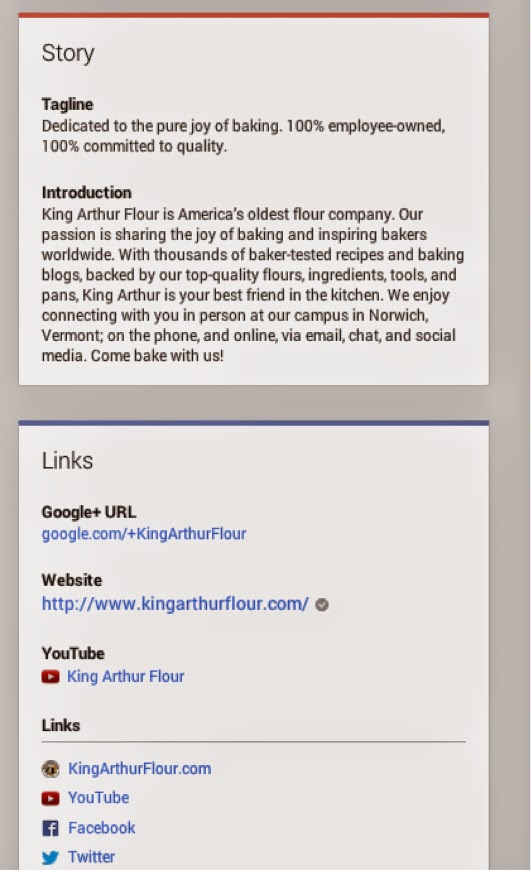
Example; King Arthur Flour G+ Page

  • Complete your business "About" section.
    • Use a keyword in your tagline
    • Write an interesting yet concise introduction.
    • Add links to your other pages.
    • Use your full contact information
    • Add a rel=”publisher” tag to your website
  • Claim Your Google Local Page.
  • Optimize Your Posts and Page for Sharing
    • Make an editorial calendar.
    • Vary the types of content you create or share. Blogposts, Photos, Videos, Infographics.
    • Make it visual.
  • Share Your Content.
    • Use keywords in your posts.
    • Add hashtags.
    • Choose Your Circles.
  • Promote Your Page in the Community.
    • On your website.
    • On other social media sites.
    • In-person.
    • In online conversations.
    • In a Hangout.


Google+ isn't so much a social media platform compared to Twitter and Facebook, but an identity platform that works with Google to connect across all our different devices and web services.

This means that while sites like Facebook and Twitter can still deliver traffic to your website, Google+ is so integrated across so many platforms that it has many more places to touch potential visitors. Businesses that build up their audience base today potentially position themselves to collect bigger rewards in the future.

Note: Please Stop Spamming In The Comment Section Of the Blog. More Than 1 Comment  (With Links) From Same Person Would be Deleted


Searches related to optimize google plus page


How to Get in Local Search Results on Google Search Engine

glitter-pencil
Getting listed on the first page of Google is an incredible accomplishment. Your efforts shouldn't stop there, however.
A general business listing without all the bells and whistles just won't get you the same amount of site traffic as it used to since users tend to go for the listing that stands apart from the rest. The Search Engine(SE) competition is fierce, so do not get left behind while everyone else makes the necessary changes to get noticed in search results.
Consider how you would approach building the perfect HTML web page. You might fine tune your headings, content message, include business images, and add resources to increase conversions. The CRO i.e Conversion rate optimization  is just as important in the search engine result pages (SERPs).

Here are a few important SEO tips that should help your Google search result attract the most attention.
SERP Optimization

1. Unique, Relevant Page Titles

A good character range to work with is 50-65 characters. Google search results will truncate right around the 65 character mark.

Pixel width of your title tag should be considered, because words with wide letters such as A and W won't be able to fit as many characters. Google  search result will completely ignore anything past the 70 character mark and potentially report a “Long title tag” error in Google Webmaster Tools.

Your web page title should be unique and relevant to the topic of your page. Include your targeted key phrases as close to the beginning as possible and, if it applies, localize your page title.

2. Search Engine Friendly URLs

If your domain name has your targeted keyword(s) in it, that's a bonus, however, don't go out of your way to buy an exact match domain name and get caught up in the exact match domain algorithm.
Utilize search engine friendly file names and permalink structures to make your listing more relevant, for example, /awesome-web-page/. URLs, for example, ?page-id=246, don't say anything to the user and won't help your rankings.

3. Enticing Meta Descriptions With a Call-to-Action

Your meta descriptions won't have an effect on your rankings, however, this is your chance to encourage searchers to click your link over your competition's.
Your descriptions should range from 100 to 150 characters. Use them wisely. Anything shorter or longer might result in an error reported in Google Webmaster Tools.
Describe what the page or service is about and then ask the user to do something with a call-to-action (CTA). In my example, I include my phone number and mention that we pick up the phone (you'd be surprised how many companies don't).
Have you ever wondered what would happen if you had multiple page title tags in the head of your webpage? How about multiple meta description tags? Check out this Google SERP's experiment.

4. Google Authorship

Google authorship is one of the most effective ways to make your search result stand out from the others, especially if nobody else in your niche is doing it. If you Google anything SEO related, the SERP's are peppered with faces; however, if you're in an industry that is less tech savvy, like construction or real estate, you could likely be the only one with your face in the search results.
Authorship is pretty easy to implement. If you haven't already claimed your content with Google authorship, follow this tutorial to find out how.

5. Google Local

Optimizing your website and brand for local can be very beneficial whether it's for a huge company or a small mom-and-pop shop. You can review the accuracy of your business listings with tools likeGetListed.org.
Claiming your business listings and filling out your profiles completely help Google to understand more about your business. Businesses with more citations from high-quality websites will rank higher.
By helping Google understand the link between your business listings and your website, you are more likely to have the map listing shown just below your search result.

6. Personalized Annotations

Google tries to make recommendations more discoverable to those who would find them most useful. Because people trust their friends' recommendations, personalized annotations display who have already +1'd a webpage or blog post.
You can increase the likelihood of these annotations to show up in search results by adding a +1 button and a Google+ badge on your page.
Inline annotations aren't currently supported in mobile browsers.

7. Google Reviews

Reviews
A great way to increase your local search rankings is to simply ask your customer and clients for Google reviews.

Make asking for a Google review part of your process. About 10 percent of my company's clients actually take the time to submit a website design review. While I'd like to get a review from 100 percent, the ones who do add up over time, and those gold stars really stand out in the SERPs!
Most service industries have the luxury of hand-picking who they ask to submit a review. On the other hand, restaurants and hotels, for example, have to take a different approach by monitoring their reviews and find ways to address unhappy customers with resolutions that will hopefully turn those poor reviews into great reviews.
Google Local is the most popular local vertical search engine out there. Submitting your site to Google Local enables you to show up for local queries, appear on Google Maps for searches there, and of course, appear for relevant general queries via blended search when Google detects that a local result is appropriate.
Here is a step-by-step guide to getting your site listed in Google Local:
  1. Check Google Local (local.google.com) to see if your business is already listed.
  2. Search for your company name or type of business, followed by a space and your city or ZIP code.
  3. If your listing isn’t there yet, go to https://www.google.com/local/add/login.
  4. Sign in to your Google account.
  5. If you have ever signed up for a Gmail or iGoogle account, you can enter that e-mail address and password. If you don’t have an account yet, choose Create a New Google Account and sign up for free.
  6. Submit your free business listing by following the online instructions.
  7. You can specify your hours of operation, payment options you accept, and descriptive text. Click Add Another Category and choose up to five categories for your business — these help people find your business when searching, so be sure to choose well.
  8. Select a verification method, either by
    1. Phone (immediate), or
    2. Postal mail (within two weeks)

Conclusion

Don't be satisfied with a Google listing that doesn't highlight you against the competition. Implementing these guidelines will ensure that you're well on your way to an optimized search result.
Comments System WIDGET PACK