blogger templatesblogger widgets
Showing posts with label Infographics. Show all posts

Cracking the Code on Video Marketing Success [Infographic]

A Proven Process For Driving Video Results

The visual medium has alluded the masses since ages. It was television previously which has now been overshadowed by the internet-led digital media. The digital media has undergone its own share of transformation. The content-based media is all about visuals today. Videos have their own qualities that let them attract larger masses than written content.

Video strategy is the new found love of the marketers and advertisers, both. The high-engagement factor brings a 49% higher revenue. Not every video will solve the purpose, there is always an effective way to do it. The right video content can do wonders for your brand, provided you strategize and implement the video content effectively.


Cracking the Video Marketing Code by Digital Vidya

Current State of Video

78% of people watch online videos every week, and 55% view online videos every day.

YouTube is the second most trafficked site, after Google

51% of all video plays on mobile devices.

100 million hours of video are watched each day on Facebook.

1200% Social video generates 1200% more shares than text and image content combined.

Projected Scope of Video by 2021

82% of consumer internet traffic will be video.

13% Live internet video will account for of internet video traffic.

Consumer Video-on-Demand (VoD) traffic will nearly double.

Power of Video
Video Marketing and the Makets today

Nearly 50% of internet users look for videos related to a product or service before visiting a store.

Shoppers who view videos are 1.81 times

Including video on landing pages can increase conversion rates by 80%.

Using the word "video" in an email subject line was found to increase open rates by 19% and click through rates by 65%

53% of smartphone users feel more favorable towards companies whose mobile sites or apps provide instructional video content.

Effects of Video Marketing

Consumers prefer video reviews 4 times over written reviews.

Video on a website increases the chance of a front-page Google result by 53 times.

Audiences engage with a video 10 times more than with a blog or an image.

98% of users watch an explainer video to learn about a product/service.

64% of users are more likely to buy a product online after watching a video.

Video Marketing Best Practices

Don't make videos randomly have a documented Video Marketing Strategy which helps you audit & adapt.

Make it short, 15% of viewers believe a video ad should not be no more than 15 seconds, 66% prefer a video of one-minute length.

Have subtitles as 85% of Facebook videos are watched without sound.

Don't set your videos on autoplay, 82% of consumers have closed a browser due to autoplay videos.

Have valuable content in your videos, 56% of viewers are likely to skip online video ads.

Final Takeaway Tips
Considerations to create an effective video

Create videos according to target groups and optimise them for search accordingly.

Remember KISS? Keeping it short as simple a2 2 minute length is the ideal way to do it.

Optimize your video for different platforms like YouTube, Facebook, Twitter etc.

Videos that are pure marketing puff pieces don't spread, so stop being boring & selling.

1/5th of viewers will click away from a video within the first 10 seconds, so make them appealing.

Types of Video which produc the Best Engagement

  • Product/Service demo videos
  • Brand videos on mission & culture
  • Expert interviews
  • How to' videos
  • Case studies
  • Customer testimonials
  • Live videos
  • Personalised messages

Share this Cracking the Video Marketing Code Infographic On Your Blog


Searches related to video marketing tips

+

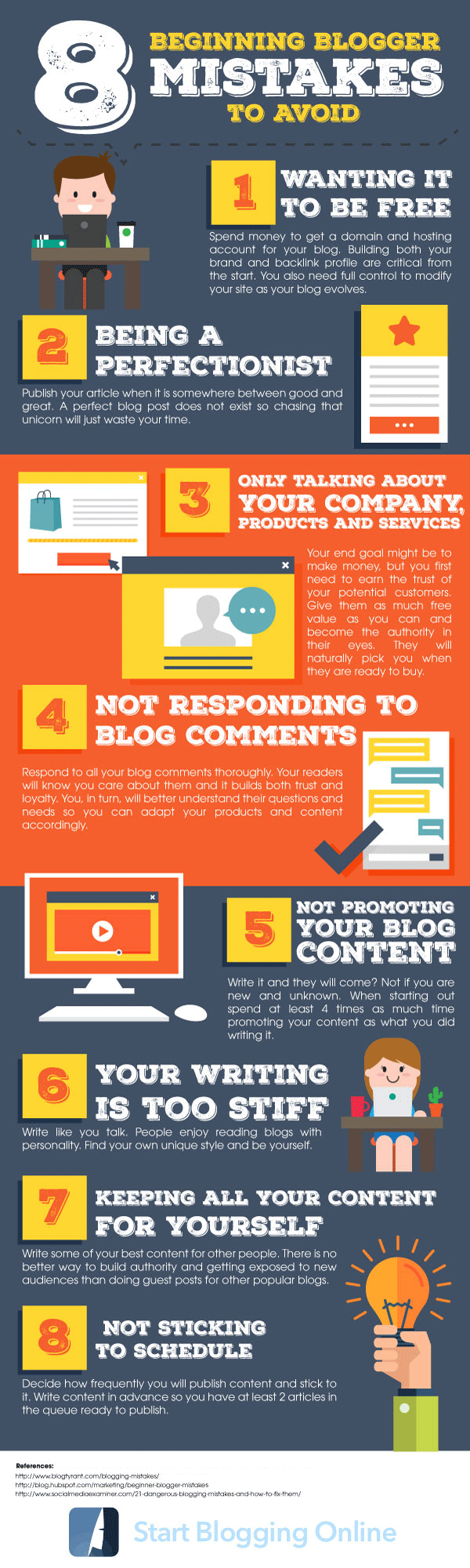
8 Beginner Blogger Mistakes to Avoid [Tips from Blogging Experts]


Blogging is one of the fastest-growing means of businesses online. However, most people have implanted this idea that blogging is as easy as a simple walk in the park. What most don’t know is that having a blog not just requires you to have an online account and publishing your articles. There’s more to having a blog than meets the eye.

Starting a blog can be fairly tough, especially for beginners. It is true that the ultimate rewards, in terms of paycheck, are amazing. But if you are not careful and attentive, you could be spending or losing your hard-earned paycheck correcting the mistakes you made along the way.

Mistakes aren’t all that bad because from them, we learn and grow. Lucky for you, we have compiled the most common mistakes beginner bloggers make to help save you from the inevitable road bumps ahead. Learning from these mistakes could save you time and money so you can only focus on content and maintaining your blog.

The detailed infographic below lists all the common errors committed by bloggers who are headstrong in creating their blogs without learning how to brand or backlink a profile. It is essential for bloggers to invest in paid ones since blogging is a business after all. Hosting your own blog allows room for customization and control, which are necessary if you are just starting.

Learn more about the blogging mistake so you can anticipate and avoid them by checking the colorful and well-crafted infographic below. Read and absorb all 8 of the listed errors and be inspired to be one of the most effective bloggers of your generation.

8 Beginning Blogger Mistakes to Avoid (SBO)
8 Beginner Blogger Mistakes to Avoid [Tips from Blogging Experts]

Searches related to Beginner Blogger Mistakes

How Productive Are Your Employees? Monitor & Manage Workplace

Infographic – How to Monitor and Manage Workplace Mumbai, India
Infographic – How to Monitor and Manage Workplace
Employees are considered to be loyal and sincere with their work and the organization they work for as well but the facts are in the otherwise case. The data collected and presented in this informative Infographic shows that the situation is very crucial. Employees don’t work effectively in the offices rather they waste most of their time in other activities like doing personal jobs and dealings. One of the biggest causes that derail the workers from work is the use of internet and social media. Internet has made social media so attractive and addictive that none can resist themselves against it. In order to maintain a perfect work environment and keep employees encouraged, the bosses should deploy TheOneSpy monitoring app to keep vigilant eyes on the employees

Please include attribution to SEO Information Technology with this graphic.

How Productive Are Your Employees? Monitor & Manage Workplace

Share this Infographic On Your Site


How Productive Are Your Employees? Monitor & Manage Workplace

Searches related to Employee monitoring


+

Selfie Culture: The Good & The Bad Trend Among Generations

Selfie Culture Among Generation - SEO Information Technology
Selfie Culture Among Generations
Elizbeth Sewell - Guest Post - Selfie Culture

Selfies are the most popular trend of today and a recent study was conducted to find out which of the living generations take the most numbers of selfies. The results of the study suggested that those born between the 1980’s and 2000’s (Millennials) engage the most in taking selfies. The breakdown of the results was 55% of Millennial’s; 24% of Gen X; 9% of Boomers and 2% of the Silent generation engages in taking selfies.

It was also found that 1 million daily selfies are uploaded and out of the many social media sites and apps where users are allowed to upload their selfies, the most popular was found to be Facebook. 48% of selfies are found to be uploaded onto this social media site after which WhatsApp is the most popular 27% which is then followed by Twitter at 9%. 

This trend is one which has now been adopted by brands and companies as well as part of their ad campaigns and while selfies can be a fun way of taking pictures and expressing oneself, they do have negative aspects associated with them. One of the greatest concerns is of privacy and how uploading selfies onto social media sites can cause a breach of privacy especially if privacy levels aren’t kept high. With selfies, it is important that the picture is appropriate and that privacy settings are kept at the highest level. Furthermore, an antivirus should also be installed onto the computer and phone to prevent any outside trouble. 

Source URL: TheOneSpy - Selfie Culture Among Generation

Selfie Culture Among Generation - SEO Information Technology
Selfie Culture Among Generation [Infographic]
Share this Image On Your Site


Searches related to Selfie Culture


+

10 Skills To Be A Digital Project Manager

Digital Project Manager Infographic | DIGITAL PROJECT MANAGER TOP 10 SKILLS REQUIRED
Become a Successful Digital Project Manager / Digital PM

Would you like to become efficient Digital Project Manager? Want to learn how to draw inspiration and come up with great ideas?

Premium IT Solutions share top 10 skills required to become more creative Digital Project Manager in the infographic below.

How to Become a Successful Digital Marketing Project Manager?

The nature of front office projects compare to traditional IT projects is one that generally involves a more co-operative project. Not only do you need developers and testers but you might need artist's, user experience and web analysts or more. As a result THE key skill of a digital PM is the ability to be a strong scrum master who knows how to be a gatekeeper not just a facilitator.

Here are top 10 tips and must-have skills required to become Digital Project Manager that will make your team love and respect you in the infographic below

Periscope vs Meerkat: Attract a Global Audience With Live Streaming Apps
Digital Project Manager Infographic

10 skills to be a Digital Project Manager

  1. Follow a project management methodology.
  2. Understand SEO / Search Engine Optimization
  3. Communication with technical staff & upper or senior management
  4. Ability to create or provide direction on building digital strategy
  5. Understanding the Power of Successful Email Marketing Relationships
  6. Managing staff and the costs to provide digital outcomes
  7. Understand social media networking and the various options available
  8. Continual business justification of the digital project
  9. Have an understanding of Google Analytics, as data analytics needs to be interpreted and communicated. At the right level of your audience.
  10. Understand the goal of the client, which is to achieve with the digital web project
Being a digital project manager, is fulfilling the roles which allow you to aid in creating a internet marketing direction for an organisation. Always remember, a fit for purpose approach to digital project management is important as we've seen over the years many organisations create digital solutions which were too big or expensive or take too long to implement.

Digital Project Manager Roles & Responsibilities

The Digital Project Manager is responsible for managing client online digital marketing needs and expectations. You'll work with a team of social media experts and designers to on-board new clients, and effectively and efficiently plan and prioritize all deliverable's and resources. You will educate clients on best practices, and consistently manage client expectations, ensure delivery of the highest quality service, and solicit and act on client feedback.

Client Marketing:

  • Analysis of account objectives
  • Client planning, client kick-off meetings
  • Digital marketing recommendations
  • Oversight of campaign execution
  • Short and long writing
  • Manage client relationships for profitability
  • Coordinate work of team members.

Client Relationship:

  • Evaluate results of engagements via recurring reports and analysis
  • Present recommendations
  • Writes case studies
  • Define scope of work for additional projects
  • Deliver compelling presentations

Other:

  • Develops a forward-looking perspective on the client’s industry and digital marketing spaces and can advise others.
  • Is a contributor to the social media space, and has relationships with other influencers.
  • Creates opportunities for personal and team’s professional growth and skill building.
  • Complete flash reports, monthly billing and expense reports on time.
  • Review of other reports.
  • Attend team meetings and may lead a portion.

Must have the ability to:

  • Monitor day-to-day activities of the project team and ensure work is progressing as planned
  • Manage schedules, budgets, and overall project organization to ensure requirements and project deliverables dates are clearly communicated, understood and executed upon
  • Work across several projects at once
  • Actively monitor project risks and scope to foresee and identify potential problems and proactively identify solutions to address them
  • Identify needs that clients may not recognize and ensure approaches and solutions are linked to objectives and future needs
  • Manage client expectations, ensure delivery of the highest quality service, and solicit and act on client feedback
  • Communicate and document project status and strategic recommendations to clients, team members and senior management on a regular basis; escalate issues accordingly
  • Proactively identify opportunities and deliver improvement
  • Proactively resolve client issues with outstanding communication


+

Optimize Your Site Speed Which Is Critical For Online Success

SPEED IS CRITICAL #INFOGRAPHIC

How slow is your website when accessed by a typical user with an average Internet connection? Find out now: Check out Google Webmaster Tools, or Alexa and type your website URL, or do a test on GTMetrix and see where your page load times is compared to your top competitors. If you are getting Ds and Fs on GTMetrix and if Alexa and GWT say your site is slower than 90% of the other websites, you are positively in trouble.

Google includes something called “Page speed” in their ranking algorithm. Many are aware of this fact, but few have taken any action to find out what it means for their business or actively worked on improving their website’s response times. Today we’ll find out how an improved page load speed can improve your online business.

Website Speed Is Critical: Tips To Make Your Website Snappy via @SingleHop

Keeping up with the health of your website is crucial. Whether you are running a online blog or a business, no visitor is going to hang around a slow website. SingleHop, a cloud computing company, has put together a tips and best practices to keep your site snappy.

Please include attribution to SEO Information Technology with this graphic.

Website Speed Is Critical: Tips To Make Your Website Snappy

Share this Image On Your Site


Speed Is Critical

If your website takes too long to load, you'll loose visitors, influence, and sales.

Fast Fact: 1/4 of visitors will abandoned a page in less than 4 seconds if it doesn't load.

We've put together this set of best practices to help you keep your site snappy.

Start Here

Test

These tools will help you test your site to see what speed problems it might have.
  • Google Pagespeed Insights and Google Search Console.
  • Pingdom Website Speed Test.
  • WordPress: Google Analytics Plugin by Yoast (incorporates Pagespeed Insights).
  • Drupal: Speedt.
After testing, there are front end solution to increase the loading speed of your website. 

Frontend Solutions

Re Design & Reorganize 

  • Refresh and reorganize content.
  • Simplify the design.
  • Use fewer "widgets".
  • Go fully responsive.

Plug Out

  • Less than 25% of sites use flash today vs. nearly 50% in 2011.
  • Replicate large flash plugins with HTML5 instead for quicker load times.

Optimize Your Images

  • Use several images sizes with appropriate HTML5 markup to accommodate responsive design - or consider SVG (scalable vector graphic) format.
  • Use CSS styling for backgrounds and borders rather than decorative images.

Social Smarts

  • Using JavaScript - heavy plugins to manage social sharing adds bloat and extra HTTP calls.
  • Use share buttons that require minimal scripting.
  • Load social media scripts asynchronously.
Nearly 60% of mobile users expect sites to be as fast on their phone as a desktop or laptop.

There are also back-end solutions to increase site loading speed and this include Content Caching e.g using plugins to create static content that speeds up server processing and delivery. Some of such plugins include W3 Total Cache and WP Super Cache.

Backend Solutions

Content Caching

  • Use plugins to create static content that speeds up server processing and delivery.
  • WordPress:
    • W3 Total Cache.
    • W3 Super Cache.
  • Drupal:
    • Page- and block-level caching are built in List of performance-related modules.

Minify

  • Stripping unnecessary characters reduces overall file size without affecting the page display.
  • WordPress: 
    • Better WordPress Minify
    • WP Super Minify
  • Drupal:
    • Speedy
    • Minify
ONE Second Improvement = 7% Increase in Conversion

Other back-end solutions include hosting content on CDN Server, Private Cloud Hosting etc.

Content Delivery Network

  • Stores content on servers close to visitor's physical locations.
  • Google Hosted Libraries is the most popular CDN service.
  • Only 11% of websites currently host HTML files on CDN servers.

Scalability 

  • Have the ability to increase resources as your site grows to avoid downtime.
  • Cloud platforms let you scale infrastructure according to your site's needs.

Private Cloud Hosting

This Infograph is made available by SINGLEHOP - the industry's fastest growing provider of hosted private cloud and on-demand servers.


+

Web Design: A History, Past, Present and Future [Infographics]

Past, Present & Future Of Web Design

Web design has been critical in the forging of internet content. From basic HTML production to cascading style sheets and the more recent emphasis on user experience, web design has shaped how we consume view information.

Please include attribution to SEO Information Technology with this graphic.

Web Design: A History, Past, Present and Future

Share this Image On Your Site


PAST

// HISTORY OF WEB DESIGN

Tim Berners-Lee published the first website in August 1991 – A simple, text based page with plain left-aligned black text and bright blue links on a white background.
Web design as we know it was born in 1993. When early browsers began to display images with text (as opposed to in a separate window)

Developing Web Design

The World Wide Web Consortium, formed in 1994, established Hyper Text Markup Language (HTML) as the standard.

By 1996, more websites focused on the following elements:

TABLE BASED LAYOUTS
  • Table Based layouts created additional design options by ind providing structure and multi-column layouts more complicated than HTML could produce at the time.
  • Table layouts allowed for navigational columns (or rows) to be incorporated with content.
  • Visually, images and text could be juxtaposed.
  • Adjusting column widths and quantity gave designers the chance to use principles of design, like the rule of thirds.
CASCADING STYLE SHEETS (CSS)
  • Cascading style sheets (CSS) created better web page structure.
  • CSS provides markup that determines the structure of multiple pages instead of creating new markup for each page.
  • CSS gave designers more creative control, allowing them to – design around the purpose of the site and finetune details.
FLASH BASED DESIGNS
  • Flash Based designs came to fruition in the late 1990s. It was designs more practical than Shockwave and presented more layout – and design options beyond HTML.
INSUFFICIENT BROWSER SUPPORT
  • Rudimentary CSS based animations were possible for years Insufficient but it wasn’t until the late 2000s, when sufficient browser browser support was available, that they were really used.
Design Details and Influences
  • The dot-com boom at the turn of the century demanded better web design among competitors: usability, accessibility, layout, color choice, typography etc. became important considerations when designing websites.
CSS-based design gained popularity due to its advantages, such as:
  • Reduced markup clutter and cleaner layouts with visual consistency
  • Separated design elements from content
  • Improved page response time
These influences caused a maturation of design principles:
  • Simple designs rely on good use of color palettes, typography, and contrast.
  • Contrast is kept minimal conveying information concisely.
  • Apple.com started a clean web design trend as early as 1999 and has inspired countless websites.
PRESENT

// RECENT TRENDS IN WEB DESIGN

Mobile Devices

With the growing number of mobile devices and the growing use of mobile access to the web, web design is no longer limited to desktop or browser compatibility.

The iPhone’s popularity, sleek design, lack of flash support, and focus on thumb navigation has impacted web design trends. Websites can be seen with overall layouts that look like an app as well as changing the way they use flash, utilizing large buttons instead of text links, using crisp quality images and video, and consistent branding, colors, layout, and typography between the website and official app.
In addition to designing with mobile in mind, designers also have to contend with multiple devices (tablets, e-readers, smartphones) and with more than one OS version for each type of device.
Responsive Web Design

A fluid grid is an adaptive grid layout in which every element is re-sized i proportional to the container within the CSS without further structure or back-end coding needed for each size.
Responsive web design takes fluid grids further by utilizing embedded media queries in the CSS that respond based on the media device the user is accessing the website with.
The iPad’s touchscreen, advanced retina display, and ability to flip between landscape and portrait pushed design to accommodate the users preferences, switching between devices, and natural hand movements in a way that had never been done before with traditional desktop layouts.

Full Screen Apps

Needed to either update, keep multiple sizes of, or only use externally hi res raster based images.
Use vector based images which can accommodate any resolution
FUTURE

  // HOW NEW TECHNOLOGY WILL ALTER WEB DESIGN

Biometric Fingerprints

The iPhone has a Touch lD system that scans your fingerprint to act as a security measure, instead of a password, to prevent your phone from being unlocked should it be lost or stolen.

While there is some concern as to the overall safety of using an individual’s fingerprints as a mainstream security measure, many wonder if similar technology may soon change how users access secure websites.

Online Banking

The top 10 UK. banks offer their own app designed with features like bill pay, person to-person payments, and check deposits through mobile phone.

More banking sites are using responsive web design to accommodate mobile users who access the main site.

Siri, Google Glass and Leap Motion

Users have traditionally accessed the internet through a graphical-user interface (GUI).

Applications and devices like Siri (voice), Google Glass (voicevision, and Leap Motion (gesture) are changing the way we can access the web.

As a result, web design will need to accommodate:
  • Requests and searches for information outside of a traditional search engine:
  • Gathering specific information rather than visiting an entire website
  • Navigation using more natural language and movement rather than clicking a mouse
Advertising

Some sites are using fewer ads, leaving them out in key places to focus on consumer needs, and requiring ads to blend with the web design.

Traditionally web ads are sold in set sizes and exact positions, but recently ad sizes, placement, and how they are sold is changing with the adoption of responsive web design.

The complications created with responsive web design and advertising may be the catalyst that initiates an overhaul in the way web content generates revenue altogether.

Social Media

Social media’s popularity now requires designers to integrate social media into web design.

Beyond branding and marketing, social networking sites are excellent sources of successful design and layout that turn potential users into frequent, regular users.

“Conclusion”

With more than 20 years of history, web design has come a long way from the days of plain white pages and lists of bright blue links. Its already clear developing technology and changing web culture is altering the way web design is approached so only time will tell how future OF- technology will continue to shake up the design world.

Web Design: A History, Past, Present and Future


+
Comments System WIDGET PACK