blogger templatesblogger widgets
Showing posts with label geo-location keywords. Show all posts

Importance Of Keyword Density and Search Engine Optimization - SEO Services Mumbai, INDIA

Keyword density and Search Engine Optimization

SEO Services, Mumbai INDIA


good Search Engine Optimization (SEO) consultant would start with keyword research for your website as a first step towards optimizing your website for search engines. On selection of the right keywords for your website, the search engine optimization analysts would get engaged in keyword density management on your website pages. 

Keyword density is an indicator of the number of times the selected keyword appears in the web page. It is always expresses as a percentage of total word content on a website page. 
As an example, if you are optimizing a webpage for a keyword search engine optimization and you have a total of 500 words on your website HTML page. In these total 300 words, the keyword "Search Engine Optimization" (SEO) appears 25 times. 

The keyword density of that page can be arrived as simply by dividing the total number of keywords by total number of words on the web page. So in this case, the keyword density would be (25 divided by 500 = 0.05). Expressing this as a percentage, the keyword density for this particular web page would be 5% for "search engine optimization" as a keyword. 

What keyword density is ideal?

It is a very important question to which all search engine optimization experts have their own answer. As a thumb rule, do not stuff keywords in your web pages without relevance. As search engine algorithms get smarter, keyword overuse is easily found out and search engines do tend to penalize pages overdoing such activities. As an accepted standard, keyword density between 3% to 5% is ideal. 
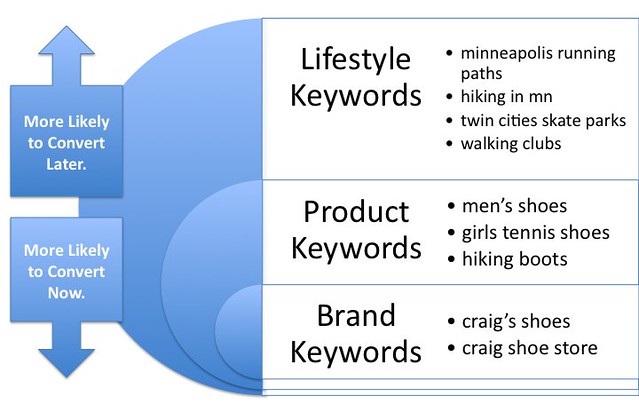
SEO Keyword Density

Steps to check keyword density for your website landing page. 


1) Copy the content from your website landing page and paste it in your word processing software like Ms Word .

2) Determine the word count of the page. This will give you the total number of words on your page. 

3) Do a find for your keyword, in this case, "Search Engine Optimization" (SEO). Replace the word with the same text. This will ensure that you do not change the text in the page. 

4) On completion of the replace function, the will provide a count of the words you replaced. Which gives the total number of times you have used the keyword in that page.

Using the total number of word count for the page and the total number of keywords you can now calculate the keyword density for the keyword "search engine optimization".

There are a few free tools available to determine webpage keyword density as well. A good search engine optimization company would do a keyword density exercise for each and every website page.

Tags: Correct Keywords, Keyword Density, geo-location keywords, Keyword Research Tools, Keywords Tools, Importance Of Keyword Density, SEO Services Mumbai, Hire SEO Expert, 

Get up to date on what SEO will mean in 2014

The basics of SEO haven't changed much in the few years. If you followed the mantra of creating good relevant content and obtaining quality backlinks, they still haven’t changed or have they?

Here are five SEO “foundations” that were absolutely torched in 2013. And if you are still counting on any of these, stop now and get up to date on what Search Engine Optimization will mean in 2014.

1. Keywords Are The Key To Search Results


Many lamented the finality of "Not provided" when it was announced on September 23, 2013 that keywords would no longer be shown in the referral string from Google. But what many failed to see (and many still fail to see) is that search is not about keywords; it’s about intention. It always has been; but, SEOs have used keywords as an alternatives to those intentions.

If someone using the keyword “Buy”? The user must be looking to "Buy something", makes total sense. However, the search engine algorithms have progressed, the user now realizes they don't have to put the keyword “Buy” in their query. The user just have to do is click on one of the conveniently placed shopping search results, or better yet, skip the search engine altogether and use a vertical (shopping) search engine like Nextag.

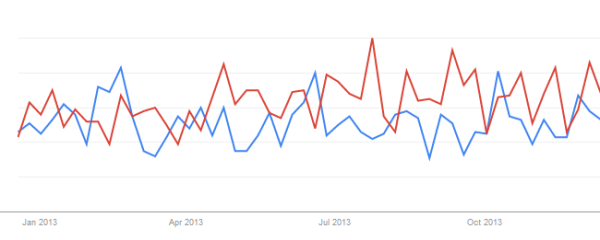
Want further proof of this? Look at Google trends. For most of  any comparison of a keyword vs. buy + that keyword, you’ll see a search trend similar to this example, showing that while people are increasingly interested in a product, their tendency to add “buy” to that product keyword is diminishing. Below is an example :  “power tools” (red) and “buy power tools” (blue).

SEO In 2014

2. Geo-Location Keywords Are Important


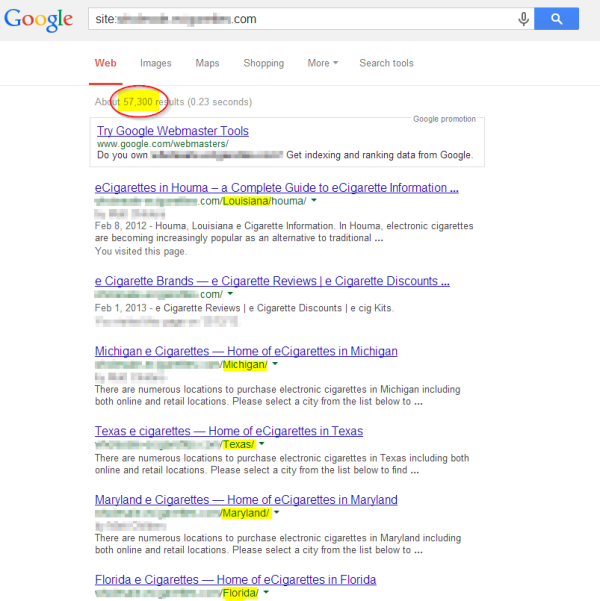
It used to be that if you wanted your site to show up for a specific city or town, all you had to do was create a page that showed the town or city and state along with the keyword. This led to millions of pages on the net like these:

Not only is this no longer a recommended tactic; the Google Panda algorithm was created in part to stamp out this practice. Instead,  you now have to have a Google Places/Pages/Whatever they are calling it profile for a verified address in the local area to rank well in search results.

Additionally, you have to use schema tags (or Hcard or whatever) to mark up your address. The search engines think that because our office is physically located in Reston, VA,  we're more relevant there than anywhere else in the country – even though the majority of our clients are not from VA. So, we also have the death of common sense to celebrate.

Hopefully, this particular issue will be short-lived, since again, the users (searchers) are becoming more savvy and realizing they don't have to enter the city name to get a local result – unless, of course, they want a location outside of the area they are currently in… however I digress. Suffice it to say this particular practice is torched, but there’s not yet a good replacement resolution.

3. 302 Redirects Have A Function For SEO


302 redirects were used for SEO back in the day because the search engines would only crawl sites every now and then (not multiple times a day like they do now). If you were making a HTML page change that you didn’t expect to stick for a long period of time, you would need to post a 302 redirect so the search engine wouldn’t change your listing during the time before you went back to the old HTML url.

The official reason for this in SEO was that you didn’t want the search engines to update all your inbound links to the new HTML page URL, as indicated by w3.org directive : “302 Found… The requested resource resides temporarily under a different URl's. Since the redirection might be altered on occasion, the webmaster SHOULD continue to use the Request-URl for future requests. This search  response is only cacheable if indicated by a Cache-Control or Expires header field.”

However, Google went on record in August 2012 stating: “the 302 is something where we would still pass the Page Rank. Technically with the 302, what can happen is that we keep the redirected URL and just basically use the content of the redirected URL.”

We began to see this really work out in 2013 as we saw more and more sites getting penalized for bad links to their site – especially affiliate links, which often go through 302s with the intention (incorrect) of stopping the flow of PageRank.

4. 404 Error Pages Should Be Reserved For Outdated Pages


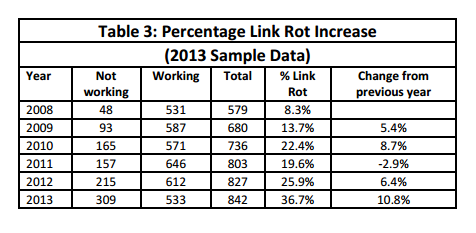
Hundreds of sites are being forced to deal with inbound links that they can’t control by making the destination page go to a 404 or 410 page result. Which means there are thousands of new broken links on the web as a result of Google’s heavy-handed penalties.

This is terrible for user experience, however you can’t control the links into your site and can’t get the webmaster to respond to you to remove them, it’s the only option to get back in Google’s good graces. Google provides disavow bad links tool, but they also say you have to make a concerted effort to remove the links first – and they don’t consider a spreadsheet with hundreds of “no response” entries to qualify.

If you start looking at search results on a particular site: level — especially for news sites that posted a lot of press releases and later removed them due to pressure from the webmasters that syndicated them in the first place.


5. Links To You Can’t Hurt You


This is possibly the biggest SEO understanding that was torched in 2012 and 2013. Back in October, 2007, a Googler said : “I wouldn’t really worry about spam sites hurting your ranking by linking to you, as we understand that you can’t (for the most part) control who links to your sites.”

This week, Matt Cutts said : “But if you really want to stop spam, it is a little bit mean, but what you want to do, is sort of break their spirits.” I think commenter “hGn” puts it best: “The collateral victims of the [Google] experiments are much more than the spammers that these algorithms are really stopping or frustrating.”

What I can conclude as an SEO consultant is that the people with broken spirits are the companies that hired the spammers, not understanding what they were going to do. The spammers have already moved on to their next victim.

I somehow doubt that the search engines (Google especially) will abandon their vendetta against spammers long enough to help the new SEO best practices actually work the way they are intended to. Hoping for better SEO news in 2014.

Common SEO Mistakes Made by Web Designers

1. Welcome Page

A big mistakes made by many people who make a welcome page that appear when their site load and place a link that redirect to the main page of their site. Home pages get high page ranks and will not crawled if there is no proper structure of internal linking. Welcome (home) page having link in flash objects make impossible for search engines spiders to follow that link and make it a bad practice.

2. Flash Navigation Menus

A common mistake made by many designers is use of flash navigation menus. Flash menus may look nice but make difficult for spiders to follow those links.

3. Use Of Images Instead Of Text

Every designer want to give a better look to its web design and sometimes it leads to negative SEO implications. Designer tend to focus on design itself and not think about SEO and thus replace text that make overall design ugly with eye catching and cool images to attract visitors. Search engine spiders cannot read text in images and hence cannot follow those contents.

To get a better search engine friendly design, designers should try to avoid these mistakes. This will also make it possible for professional designers to survive in this competitive industry.
Common SEO Mistakes Made by Web Designers
Comments System WIDGET PACK